
Activate Your One Good Card ProductsUpdated 2 months ago
Ready to link your physical One Good Card, mini, or One Good Ring to your digital profile? Activating your One Good Card product is quick and simple. Follow these steps to get started.
💡 Quick Answer:
Log in to your One Good Card account, click Activate, select your product type, enter the serial number, choose your profile, and click Activate. Your product is instantly linked and ready to use.
How to Activate Your One Good Card Products
- Log in: Open your One Good Card account.
- Click Activate: On the homepage, select Activate.
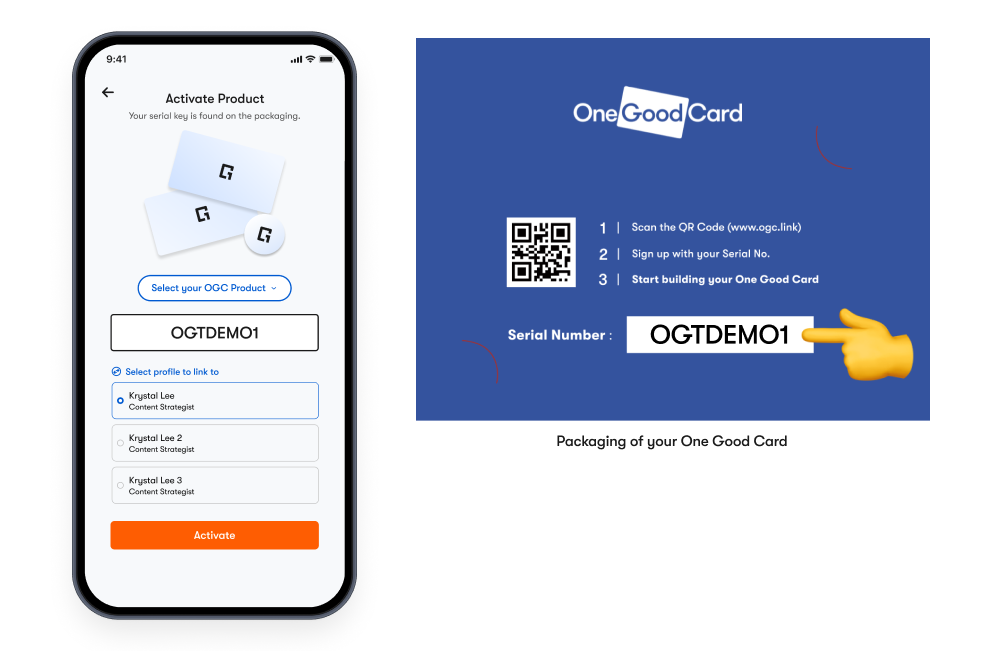
- Select Product: Choose the type of product you’re activating (Card, Mini, or Ring).
- Enter Serial Number: Type the serial number printed on the product or packaging (e.g. OGT123A).
- Choose Profile: Select which digital profile you want to tag the product to.
- Activate: Click Activate — your product is now linked to your profile.
✨ Pro Tips:
- Double-check your serial number — letters and numbers can be confusing (e.g., "O" vs "0").
- You can manage multiple products under the same account for easy team networking.
- Keep your product packaging until activation is complete, in case you need the serial number again.
Frequently Asked Questions
Q: My profile shows "Profile not Found" after tapping the card
A: This usually means your card hasn’t been activated yet. Please repeat the activation steps above. If it still doesn’t work, email us for help.
Q: Do I need to create an account before activation?
A: Yes — you'll need to sign up or log in to connect your product to a digital profile.
Q: I entered my serial number, but it says it's invalid. What do I do?
A: Double-check that you've entered the correct letters and numbers. If it still doesn’t work, email us for help.
Q: Can I activate more than one product on the same account?
A: Yes! You can activate and manage multiple One Good Card products under one account.