
Profile Privacy ModeUpdated 2 months ago
Profile Privacy Mode on One Good Card gives you full control over what others see when you share your profile. It hides your personal contact details such as your phone number and email, so you can confidently share your card anywhere, whether it’s at events or online as your link in bio.
What is Profile Privacy Mode?
Private Mode allows you to share your One Good Card without exposing your sensitive information. When enabled, people can still view your profile, links, and public details — but your personal contact info stays hidden.
What Happens When Profile Privacy Mode is On
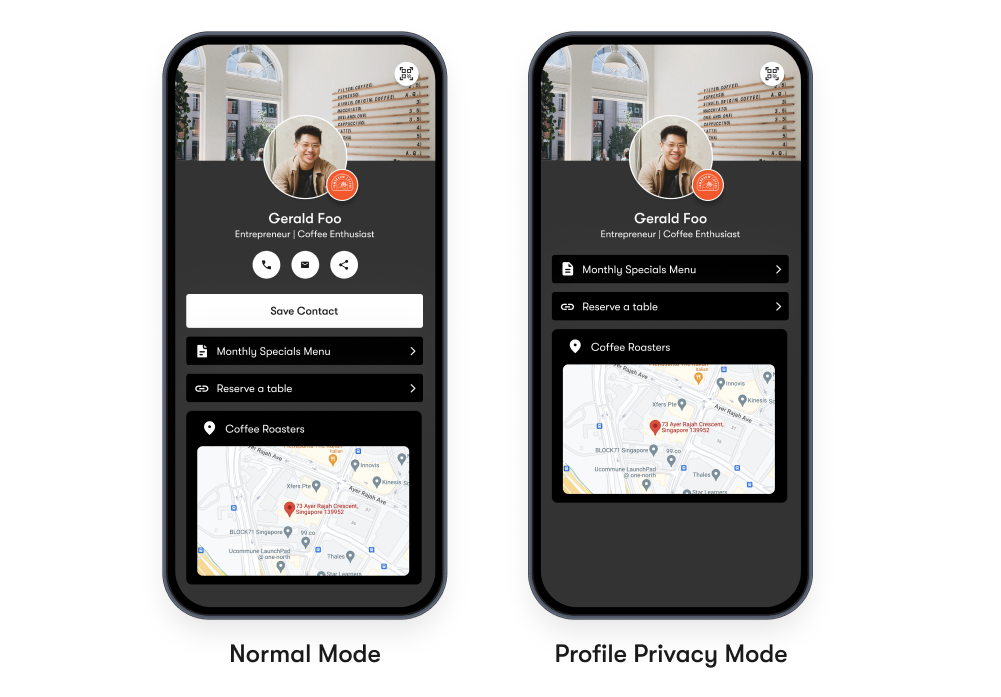
- Your phone number and email are hidden from public view.
- Visitors can still access your profile, links, and portfolio.
When to Use Profile Privacy
Profile Privacy Mode is ideal for:
- Public events or exhibitions – where many people may scan your card.
- Social media – when using your One Good Card as your link in bio.
- Online directories or websites – to display your profile without sharing contact info.
How to Enable Profile Privacy Mode
- Log in to your One Good Card dashboard.
- Select the business card profile you would like to edit (Pen icon).
- Head to Advanced Settings.
- Toggle Profile Privacy ON.
- Your contact information will automatically be hidden from public view.
How to Turn Off Private Mode
- Return to your Advanced Settings.
- Toggle Profile Privacy OFF.
- Your contact details, and buttons will become visible again to visitors.
✨ Pro Tips:
- Use Profile Privacy Mode when sharing your card at large public events or expos.
- Perfect for creators or freelancers using One Good Card as a link in bio.
- Enable your Contact Form so people can still reach you safely without revealing your personal details.
- Switch off Private Mode anytime if you prefer to show full contact info for trusted contacts.
Frequently Asked Questions
Q: What happens when Private Mode is on?
A: Your phone number, email, and buttons are hidden from your public profile. Only your basic information, links, and media remain visible.
Q: Can people still contact me while in Private Mode?
A: Yes! Visitors can still use the Contact Form on your profile to send you messages safely, without seeing your personal info.
Q: Can I still use Private Mode as a link in bio?
A: Absolutely. Private Mode makes your One Good Card perfect as a link in bio — you can showcase your work and links without exposing contact details.
Q: Does Private Mode affect analytics or CRM tracking?
A: No, your analytics and CRM features still work the same way. You’ll continue to see who views or interacts with your card.