
Sharing Obsidian Metal One Good CardUpdated 2 months ago
The Obsidian Metal One Good Card is built for style and durability — the front is fully stainless steel and the card includes a single-sided NFC transmitter on the back (the side with the QR code). Below are the best ways to share your Obsidian card and a few important tips to make sharing seamless.
💡 Quick Answer:
To share using NFC, present the back of the Obsidian card (the side with the QR code) to the phone’s NFC reader. You can also let people scan the printed QR code or copy your profile link to share via message or email.
How to Share Your Obsidian Metal One Good Card
Share via NFC
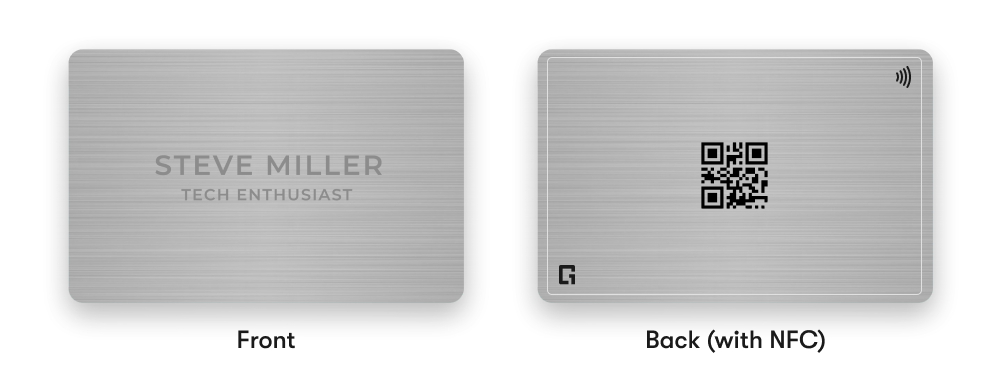
- Hold the card so the back side (the side with the QR code) faces the phone you’re sharing with — this side contains the NFC transmitter.
- Ask the recipient to enable NFC on their phone (Settings → NFC). Most modern phones have NFC enabled by default.
- Bring the card close to the phone’s NFC reader (usually near the top or centre-back of the phone). A small vibration or on-screen prompt should confirm the share.
- If nothing happens, gently move the card around the phone near its NFC area until it reads.
Share via QR code
- Flip the card to show the printed QR code on the back.
- Let the other person scan the QR using their camera or a QR scanner app
- You can also download the QR code from your profile and share it digitally or print it on materials.
Share via Profile Link
- Open your One Good Card profile and copy the profile link (e.g.
ogc.link/u/yourname). - Paste and send it via SMS, email, or any messaging app — recipients can open and save your contact from the link.
✨ Pro Tips:
- Because the Obsidian front is stainless steel, the NFC transmitter is single-sided — always present the back (QR-code side) to the phone’s NFC reader.
- If NFC doesn’t trigger, check the recipient’s NFC setting and remove any thick phone case or magnetic attachments that might block the NFC field.
- Keep a high-contrast printed QR (or a downloaded PNG) on hand for events — it’s fast and reliable in crowded places.
- Use Offline Mode to generate a downloadable VCF QR if you expect no internet access (setup requires initial internet to download the offline profile).
Frequently Asked Questions
Q: Does the stainless steel front affect NFC?
A: The Obsidian card is designed with a single-sided NFC transmitter on the back to avoid metal interference. Always use the back side (QR side) for NFC sharing.
Q: My phone didn’t detect the card, what should I do?
A: Ensure the phone’s NFC is enabled, remove heavy or magnetic cases, and try moving the card slowly over the phone’s NFC area. If it still fails, use the QR code or profile link instead.
Q: Can people save my contact without the internet?
A: Yes, it is possible with Offline Mode. Refer to this guide to find out more.
Q: Is the QR code always active?
A: Yes — the printed QR on your Obsidian card points to your live profile. If you update your profile, the QR will reflect the latest details.