
Sharing Your One Good CardUpdated 2 months ago
In this guide, we'll show you how to effortlessly share your digital name card using One Good Card. With various sharing methods at your disposal, networking has never been simpler. Let's dive in!
💡 Quick Answer:
Share your One Good Card instantly via NFC tap, QR code, or your profile link. iPhone and Android users can tap their device against another NFC-enabled device, use the printed or profile QR code, or simply copy and share the profile link
Sharing via NFC
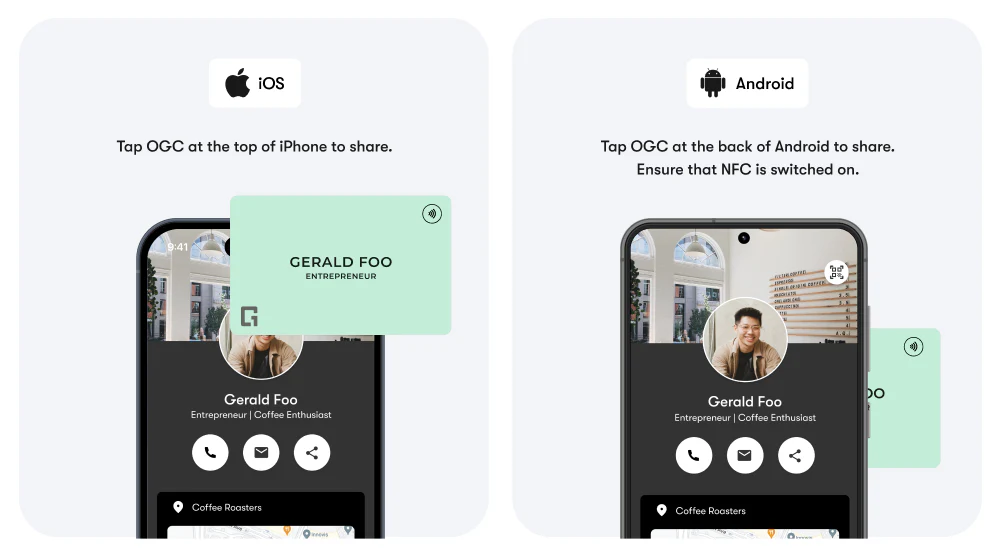
- iPhone Users: Tap the top of your iPhone against another NFC-enabled device.
- Android Users: Tap the back of your Android phone against another NFC-enabled device. Ensure NFC is enabled in your phone settings.
This method instantly shares your contact information with others who have NFC-enabled devices. Watch a detailed demo video here.
Sharing Using a QR Code
 There are two ways to share your digital name card using a QR code:
- Printed QR Code: Your One Good Card comes with a QR code printed on it. Ask someone to scan this code to instantly retrieve your contact information.
- Profile QR Code: You can also find a QR code in your One Good Card profile. Share it the same way for easy access.
You can also download the QR code from your profile and include it on your virtual background in video calls so anyone can scan it.
Sharing Your One Good Card Profile Link
- Copy the profile link from your One Good Card profile.
- Share the link via text message, email, or social media.
- Recipients can click the link to view and save your digital name card.
Frequently Asked Questions
Q: Can I share my One Good Card without internet?
A: Refer to this guide to learn more about sharing your One Good Card without internet
Q: Can anyone scan my QR code?
A: Yes — anyone with a QR code scanner can access your One Good Card profile.
Q: Is there a limit to how many times I can share my card?
A: Nope — you can share your One Good Card as many times as you like via NFC, QR code, or profile link.