
What is One Good Card for TeamsUpdated 2 months ago
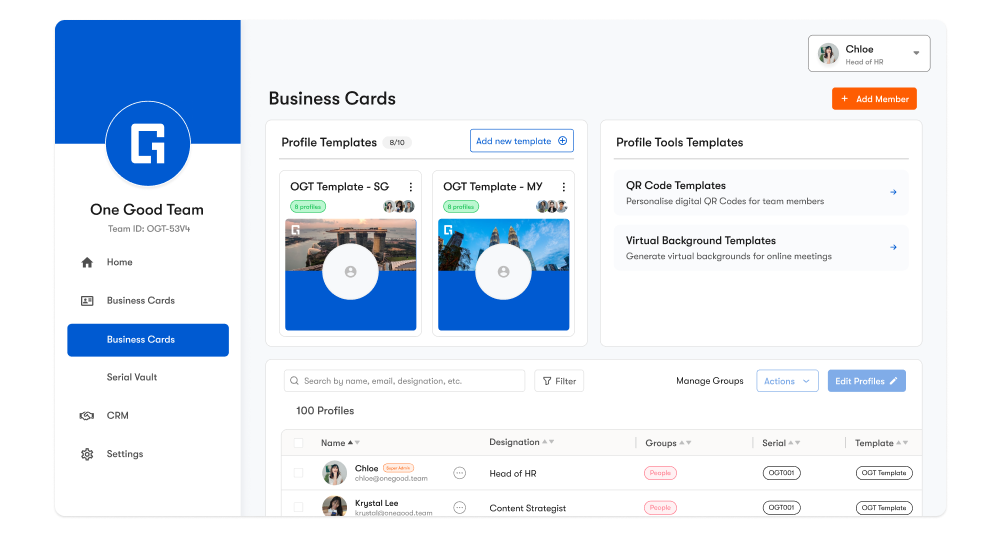
One Good Card for Teams (also known as OGC for Teams) is a centralised solution for organisations to manage and scale digital business cards across an entire team. Instead of each employee managing their own card independently, OGC for Teams gives admins one place to control branding, update profiles, manage hardware serial numbers, track performance, and organise leads, all through a centralised dashboard.
What is One Good Card for Teams?
One Good Card for Teams is built for businesses that want to onboard employees quickly, keep all profiles consistent, and make networking measurable. Admins can create standardised profile templates, apply them to team members, and manage everyone’s digital business card experience from one dashboard.
Who is it for?
OGC for Teams is ideal for organisations that manage multiple employees, especially when consistency and speed matter.
- HR teams onboarding new employees at scale
- Sales teams managing leads and follow-ups
- Marketing teams enforcing brand consistency across profiles
- Agencies and consultancies managing multiple staff profiles
- Event teams tracking engagement and follow-ups after conferences
What can you do with OGC for Teams?
- Centralised Business Card Dashboard: Manage, edit, and oversee all team profiles in one place.
- Team Templates: Create reusable business card templates for layouts, widgets, and styling.
- Personalised Widget Fields – Keep template structure consistent while allowing individual details (e.g. phone, email) per member.
- Serial Vault: Store, link, unlink, and transfer serial numbers for physical NFC cards.
- Analytics: Track profile engagement and CRM performance across the team (views, saves, lead count).
- CRM: Manage contacts, companies, and deals to improve follow-ups and sales workflows across the organisation
Why OGC for Teams?
When profiles are managed individually, branding becomes inconsistent, and mass updating of information takes time. One Good Card for Teams solves this by giving companies admin-level control and repeatable workflows. It’s the easiest way to keep every employee profile clean, current, and on-brand, while ensuring the company can track performance and scale onboarding smoothly.
How It Works (Overview)
- Create your OGC for Teams dashboard: Admin sets up the team dashboard and billing settings.
- Add team members: Invite members individually or bulk upload via CSV.
- Create a Team Template: Standardise widgets and styling across all members.
- Assign hardware serial numbers: Use Serial Vault to link cards
- Track performance: Review analytics and manage follow-ups using CRM tools.
✨ Pro Tips:
- Create templates before onboarding large teams to save time and ensure brand consistency.
- Use Serial Vault to reuse older card batches for new hires.
- Review team analytics weekly to identify what links or profiles perform best.
Frequently Asked Questions
Q: Do team members need an app to use One Good Card?
A: No. One Good Card works via the browser. Team members share by NFC, QR, or link without requiring an app.
Q: Can we control how employee profiles look?
A: Yes. Admins can create Team Templates to control layout, widgets, and styling across all members.
Q: Is One Good Card for Teams suitable for large organisations?
A: Yes. Teams supports bulk onboarding (CSV), admin controls, templates, and Serial Vault, designed to scale across departments and hiring cycles.
Q: How do I onboard OGC for Teams?
A: You may request for a demo here.